
Contents6
A notification is the app speaking when nobody is looking at it. Used well, it announces an awaited reply, an approaching appointment, an action to take. Used badly, it becomes noise, and the user has two gestures within thumb’s reach: switch notifications off, or delete the app. The difference does not lie in the sending technology but in three decisions: when to ask for permission, what to send, and what the user can adjust.
In short
On iPhone and on Android 13 and later, an app cannot send anything without permission: roughly one user in two grants it.
Ask for permission after a gesture that shows interest, never at first launch.
A notification says something specific to someone specific; promotion requires explicit consent.
A switch per topic beats all-or-nothing, which ends up as nothing.
Permission, a door that opens once
On iPhone, an app has always had to ask before sending notifications. Android followed: since Android 13, according to Android’s documentation, notifications from a newly installed app are off by default until the user accepts them. As a result, the two platforms now look alike.
Share of users who accept notifications, 2025 median
These medians come from the apps of a notification tooling vendor’s customers, mostly large consumer brands: they give an order of magnitude, not a target. But they say the essential: half the time, the answer is no. And a refusal is hard to recover, since the user then has to dig into the phone’s settings.
Hence the rule Android’s documentation gives: let users get familiar with the app, then ask for permission in a context that explains what notifications will be used for, for example when they tap a bell or follow a topic.
What deserves to be sent
A useful notification answers yes to three questions: would this person want to know now, can they act on it, and would they not know otherwise?
What we keep
A reply or an approval the user is waiting for
An appointment or a deadline coming up
An event that directly concerns them, in a group they belong to
What we avoid
“We miss you” sent to everyone who has not come back in three days
A promotion sent without explicit consent
The same message repeated every day, whatever the person does
Promotion is not forbidden, but it has rules. Apple writes them in guideline 4.5.4 of its App Review Guidelines: notifications must not be required for the app to function, should not carry sensitive personal or confidential information, and may only be used for promotion if the user has explicitly opted in within the app, with a way to opt out.
Frequency weighs as much as content. According to the same Airship report, the top reason consumers give for opting out is that messages arrive too often.
From the field
In Challenge Us, a monthly challenge only reminds on the last day
Challenge Us, a group-challenge app we built, notifies participants when someone else logs their day or completes it. Each challenge has its own notification switch, and a challenge played over a week or a month only sends a reminder on the last day: a reminder every evening would be harassment.
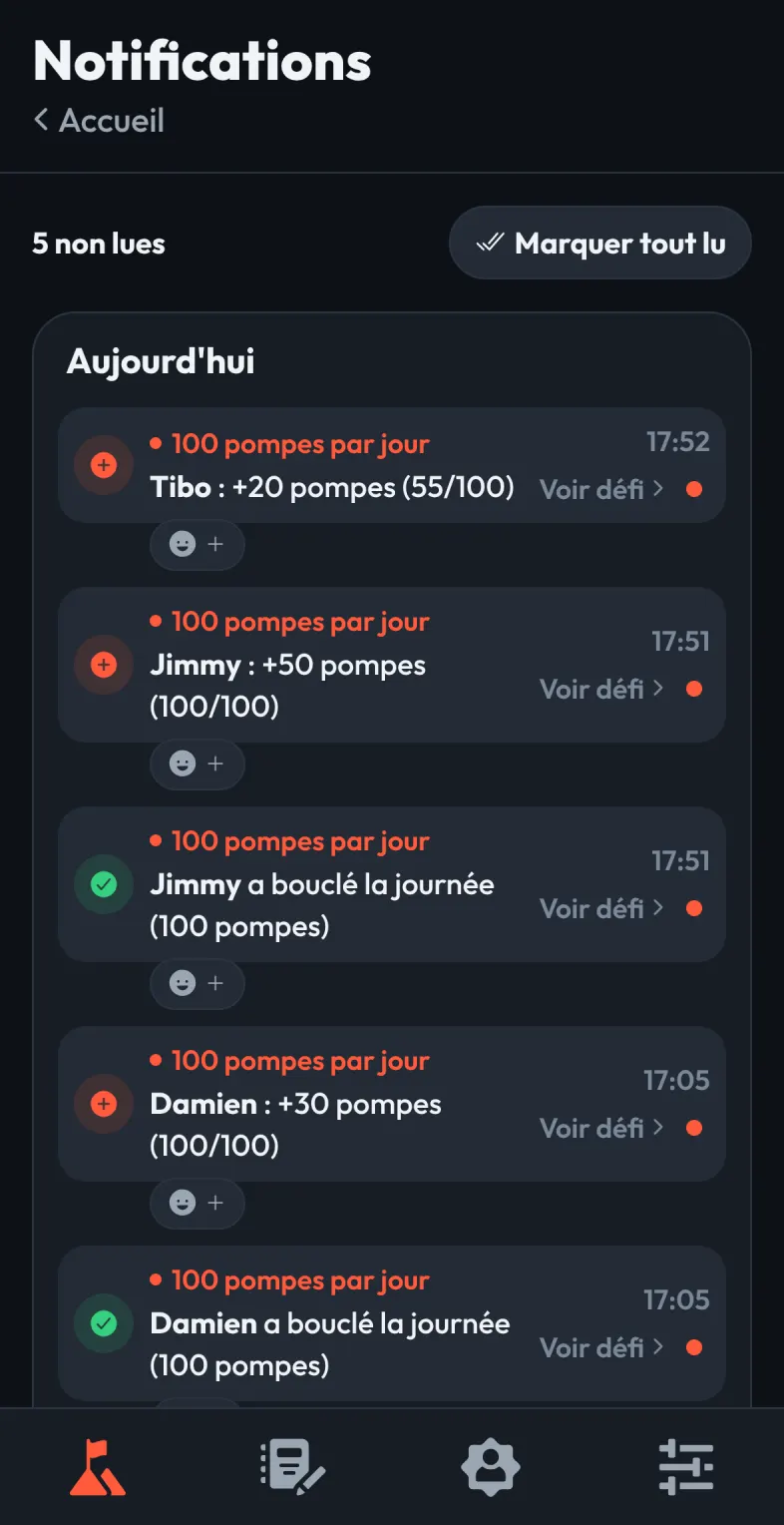
The Challenge Us notification centre: each participant’s entry notifies the others. Screenshot in demo mode, with made-up names and figures; the app is in French.
This choice is not just about politeness. The mechanisms that bring people back to an app (reminders, streaks, rewards) can also play on a vulnerability, which we examine in our article on AI companions and teenagers.
The settings that prevent “switch it all off”
If the only choice is all or nothing, a user annoyed by one type of message also switches off the ones that helped them. A few settings are enough to avoid that:
- A switch per topic: per project, per file, per group, per type of event.
- Grouping: one summary rather than ten notifications in a row when a lot happens in a short time.
- Quiet hours: nothing at night, except what is truly urgent.
- An in-app notification centre, which keeps track of what was sent, so missing a notification does not mean missing the information.
Web, iPhone, Android: what each channel allows
An installable web app can also send notifications. On iPhone, that has been possible since iOS 16.4, provided the app has been added to the home screen, according to WebKit’s announcement. A page simply opened in Safari does not receive them. We go into these limits in PWA or native app: which to choose for your business.
Challenge Us lives this situation: its browser version already receives web notifications, and its native notifications are ready but wait for the store version. That version goes through publishing under a developer account in its own name, whose paperwork takes time.
For an internal app, the question is different: teams often need to be alerted about a job or an approval, but on a work phone, within working hours. That is a setting to plan in an app for field teams, and something to test with them on a clickable prototype before writing a single send.
Where to start
- List the events.
Everything the app could report, then cross out what nobody is waiting for.
- Choose when to ask.
The gesture after which the user understands what notifications will be for.
- Set a limit.
How many notifications at most per day and per person, and what gets grouped beyond that.
- Plan the settings.
A switch per topic, quiet hours, an in-app history.
Notifications are one of the decisions that make the price of an app vary: a sending service, per-user settings, grouping rules. Our app development service plans them from scoping, on the web as well as on iPhone and Android.
Frequently asked questions
When should an app ask for notification permission?
After a gesture that shows the user has an interest: following a file, joining a group, placing an order. Android’s documentation recommends letting users get familiar with the app first and asking in a context that explains the use. At first launch, with no context, refusing is the reflex, and a refusal is hard to undo.
How many notifications should we send per day?
There is no right number for every app: the right number is the one the user expects. The top reason for opting out cited by consumers is frequency. Set a limit per person, group whatever exceeds it, and offer a switch per topic so that annoyance with one type of message does not silence all the others.
Can we send promotional notifications?
Yes, with explicit consent. Apple requires that the user has agreed to receive promotional messages in the app’s interface, with a simple way to opt out. A notification must not be required for the app to work either, and it should never carry sensitive personal or confidential information.
Can a web app send notifications on iPhone?
Yes, since iOS 16.4, provided it has been added to the home screen: a page simply opened in Safari does not receive them. An app whose value depends on notifications must therefore explain installation, at the right moment and on screen, or go through the stores.
Sources
- Android Developers, notification runtime permission (new tab)developer.android.com
- Apple, App Review Guidelines (new tab)developer.apple.com
- WebKit, web push for web apps on iOS and iPadOS (new tab)webkit.org
Jim · founder of Brain Plus AI
Also in web and mobile apps
Choose and price6 min
PWA or native app: which to choose for your business?
An installable web app (PWA) goes onto the home screen without going through the App Store or Google Play, and is enough in many cases, not all. Here is how to decide, and why we start with it.
Practical guide7 min
Publishing an app under your own developer account
The developer account that publishes an app holds its listing, reviews, users and revenue. Opened in your company’s name, it keeps you independent from your provider, as long as you start early.
Stepping back8 min
Are AI companions dangerous for teenagers?
An American survey indicates that most teenagers have already talked to an AI companion, but its figures come from a campaigning non-profit and call for caution. The design question, though, is a legitimate one, and Europe has already answered it in part.