Contents8
A visitor arrives from an ad, declines cookies, then sends an enquiry. For the ad platform, that enquiry does not exist: the tag was not allowed to link it to the click. Multiply that by every refusal, and your campaigns are steering on only part of what they produce. Google’s Consent Mode is the technical answer to that gap: it passes the visitor’s choice on to the tags, and lets Google estimate some of what is missing. This article explains it without jargon, limits included; it complements our online advertising guides.
In short
Consent Mode does not collect consent: it passes the choice made in your banner on to the tags.
For traffic from the European Economic Area, Google asks advertisers to collect consent and pass these signals on.
In basic mode, nothing is sent without consent; in advanced mode, cookieless signals are sent before the choice.
Modelled conversions are estimates, and Google sets a threshold of 700 clicks over 7 days to produce them.
Microsoft enforces its own consent mode in Europe: without a consent signal, conversions are lost.
What Consent Mode does
Definition
Consent Mode
A setting of Google tags that tells them the visitor’s consent status (granted or denied, item by item) and adapts their behaviour to that choice.
Google’s help page stresses a point that is often forgotten:
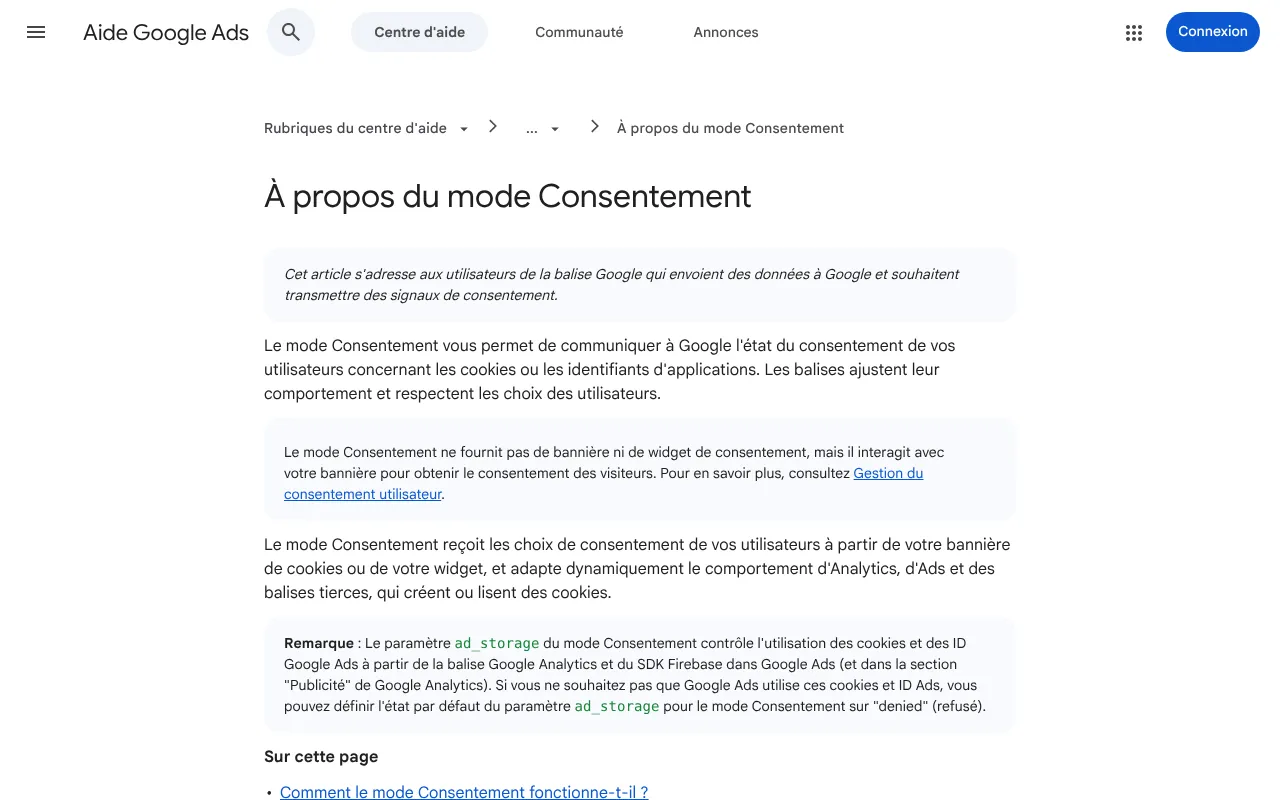
Google Ads help on consent mode (French edition): it passes consent status on to the tags, but provides neither a banner nor a widget. Captured on 19 October 2026.
The banner therefore remains your responsibility, with its own rules. In France, the CNIL points out that an advertising tracker may only be set or read after prior consent. Consent Mode comes afterwards: it tells the tags what the visitor answered.
The four signals, in plain words
Google’s documentation describes several consent types. Four matter for advertising and measurement:
- ad_storage: permission to store cookies or identifiers related to advertising;
- ad_user_data: permission to send user data to Google for advertising purposes;
- ad_personalization: permission to personalise advertising, retargeting included;
- analytics_storage: permission to store cookies related to analytics.
The two in the middle belong to the second version of Consent Mode. Google states that to use ad personalisation, advertisers must collect consent from end users in the European Economic Area and share these signals with it; since March 2024, a first-version implementation there has its ad_storage value copied once into ad_user_data.
Basic or advanced mode?
This is the only real choice to make, and it commits both your measurement and your compliance.
Basic mode
Tags do not load until the visitor responds to the banner
If consent is declined, no data goes to Google
Lost conversions are estimated with a general model
Advanced mode
Tags load on arrival, with consent denied by default
If consent is declined, they send cookieless signals
Lost conversions are estimated with an advertiser-specific model
Advanced mode measures better, since Google receives something even after a refusal. Basic mode is the easiest to defend, since nothing leaves without consent. Sending signals, even cookieless ones, before the visitor has chosen is a compliance decision as much as a measurement one: take it with whoever is responsible for your compliance, not just with your advertising provider.
Modelled conversions: what they are worth
When a visitor declines, Google does not see their conversion. It can, however, estimate it from what it observes among visitors who accepted. Those estimates have two properties worth knowing.
First, they are not produced for everyone. Google’s eligibility criteria set a volume threshold:
over a seven-day period, per country and domain grouping, to be eligible
fewer conversions only, in Google’s example where one visitor in two declines: those who decline convert less often
The threshold says a lot to a B2B SME: an account buying a few dozen clicks a day does not reach it, and its declined conversions are simply not estimated. Google’s example is a reminder that a refusal rate does not translate mechanically into lost conversions. Finally, allow at least seven full days after setup before seeing the effect in reports.
Second, when they do exist, they are mixed in with the rest: Google shows them in the “Conversions” column, without separating them, and uses them for bidding too. An advertising dashboard therefore blends counted enquiries with estimated ones. Present them as such, and keep your own count of enquiries actually received.
At Microsoft, the same logic, enforced by default
Microsoft Advertising has its own consent mode for its tracking tag. Its help page also distinguishes basic and advanced modes, and makes one decisive point: in the European Economic Area, the United Kingdom and Switzerland, Microsoft enforces consent mode, the default value there is “denied”, and conversions are lost if the granted signal is not passed on when the visitor accepts. If you add Microsoft Ads to your campaigns, your banner has to talk to both tags.
What Consent Mode does not fix
Measuring your own site
Consent Mode serves the ad platforms. To know what happens on your site, refusals included, the CNIL accepts that some audience measurement tools are exempt from consent, under conditions. On Palmora Property, a property listings site we work with, Matomo installed without cookies, and therefore without a consent banner, took about three hours, where the alternative stacked GA4, a consent manager, Consent Mode and a tag container.
Signed sales
A submitted form is not a sale. CRM stages (qualified enquiry, quote, contract) are sent back to the platform through an offline conversion import, described in our guide to sending CRM sales back to Google Ads. That loop has its own consent rules, set out in the guide: it does not exempt you from the banner.
Where enquiries come from
On this site, since 18 October 2026, every enquiry sent through the form carries the campaign parameters, landing page and referring site of the visit, kept for the browser tab without a cookie. An enquiry that came from an ad is thus recognisable in our own data, whatever choice was made in the banner, without sending anything to an ad platform.
Checking that the setup works
- Test the banner.
Accept, decline, change your mind: each choice must reach the tags.
- Read the signal sent.
Each platform’s tag assistant shows the status sent with every event; at Microsoft, a consent status per tag appears in the dashboard.
- Compare with your enquiries.
The platform’s conversions against the enquiries actually received, every month.
- Choose the mode.
Basic or advanced, with whoever is responsible for your compliance.
Consent Mode across the rest of your campaigns
- Retargeting shrinks to the visitors who accepted: what still works without third-party cookies.
- Acquisition cost is calculated on sales, not on estimated conversions: calculating it to the signed sale.
- Automated bidding learns from what it sees: the minimum budget that gives a signal and what Performance Max hides.
- An ad test loses conversions in the same way on both sides: how many clicks before concluding.
- Other platforms have their own tags and their own consent: Google Ads or Meta, LinkedIn Ads, social media, YouTube.
- The landing page must not hide its content behind the banner: why the ad is never the only problem.
- A local campaign is measured mostly in calls: attracting customers within 20 km.
- Useless searches skew measurement as much as refusals: negative keywords.
- An agency should say who sets up consent and who answers for it: what the contract should contain.
- The choice between ads and SEO also depends on what can be measured: SEO or paid search.
- New placements in AI answers are measured through your site: what we know; and generated visuals have their own obligations there (advertising and AI, AI and disinformation).
To overhaul the banner, the signals passed to ad platforms and the measurement of sales, our digital marketing offer starts with a review of your data.
Frequently asked questions
Is Consent Mode mandatory?
Google asks advertisers with traffic in the European Economic Area to collect consent and pass the signals on to it in order to use ad personalisation. Consent Mode is the way to pass those signals to its tags. Without them, Google cannot use those visitors’ data to personalise ads, and Microsoft treats them as having declined by default.
Does Consent Mode replace a cookie banner?
No. Google says so: consent mode provides neither a banner nor a widget. It reads the choice made in your banner and passes it on to the tags. The banner, its clarity, how easy it is to decline and the proof of consent remain your responsibility, under the rules the CNIL sets out.
What is the difference between basic and advanced mode?
In basic mode, tags only load after the visitor responds, and nothing is sent if they decline. In advanced mode, tags load on arrival and send cookieless signals if consent is declined, which allows a finer estimate of lost conversions. The choice commits your compliance, not just your measurement.
Are modelled conversions reliable?
They are estimates, and Google mixes them with observed conversions in the same column. They are only produced above a threshold of 700 clicks over seven days per country and domain grouping, which many SMEs do not reach. Keep your own count of enquiries received so you can compare.
Sources
- Google Ads Help, about consent mode (new tab)support.google.com
- CNIL, cookies and trackers: what does the law say? (new tab)cnil.fr
- Google for Developers, consent mode (new tab)developers.google.com
- Google Tag Manager Help, ad_user_data mapping (new tab)support.google.com
- Google Ads Help, about consent mode conversion modelling (new tab)support.google.com
- Microsoft Advertising, set up conversion tracking for consent mode (new tab)learn.microsoft.com
- CNIL, cookies: solutions for audience measurement tools (new tab)cnil.fr
Microsoft Advertising, set up conversion tracking for consent mode
Read on learn.microsoft.com(new tab)Jim · founder of Brain Plus AI
Also in online advertising

Understand7 min
Retargeting without third-party cookies: what works in 2026
Chrome did not remove third-party cookies after all, but the retargeting built on them reaches fewer and fewer people. What happened, what still works, and the retargeting that runs on your own data.

Practical guide8 min
Send your CRM sales back to Google Ads: the guide
In B2B, the sale is signed weeks after the click, by phone or in a meeting. Until Google Ads knows that, it optimises for submitted forms, not for customers: here is how to send it the stages from your CRM.

Practical guide7 min
Customer acquisition cost: calculating it to the signed sale
The cost per lead shown by the ad platform stops at the form. Customer acquisition cost goes all the way to the contract: what goes in the numerator, what you count in the denominator, and the setup that makes the calculation possible.