
Contents6
Performance Max promises to hand Google everything a team used to set by hand: where to show, to whom, with which copy, towards which page. The promise partly holds, and that is exactly why you need to know what the campaign decides without telling you. This article does not say “stay away”: it says what to look at before giving it a budget. It is part of our online advertising guides.
In short
One campaign, all of Google’s inventory: YouTube, Display, Search, Discover, Gmail and Maps.
In 2025 Google opened reports that were missing: channels, search terms, generated assets.
You still have to check the pages it picks, the copy it generates and how much of your own brand it captures.
The campaign optimises for what you declare: with a form as the only goal, it looks for forms.
What Performance Max does
Google’s help page describes it as a goal-based campaign type that gives access to all Google Ads inventory from a single campaign: YouTube, Display, Search, Discover, Gmail and Maps. You provide conversion goals, a budget, assets (text, images, videos) and audience signals; Google decides the rest, auction by auction.
Definition
Performance Max
A Google Ads campaign type where the advertiser sets the goal and supplies assets, and Google itself chooses the channels, the audiences, the ad combinations and, if you let it, the landing pages.
The gain is real for an advertiser with plenty of reliable conversions and a broad catalogue: the campaign finds customers where nobody would have thought of building a dedicated campaign. The risk is the flip side: the more the campaign decides, the less you see why.
What Google now shows
For a long time the criticism fitted in two words: black box. Google has partly answered it. Its announcement of 7 August 2025 lists the new features:
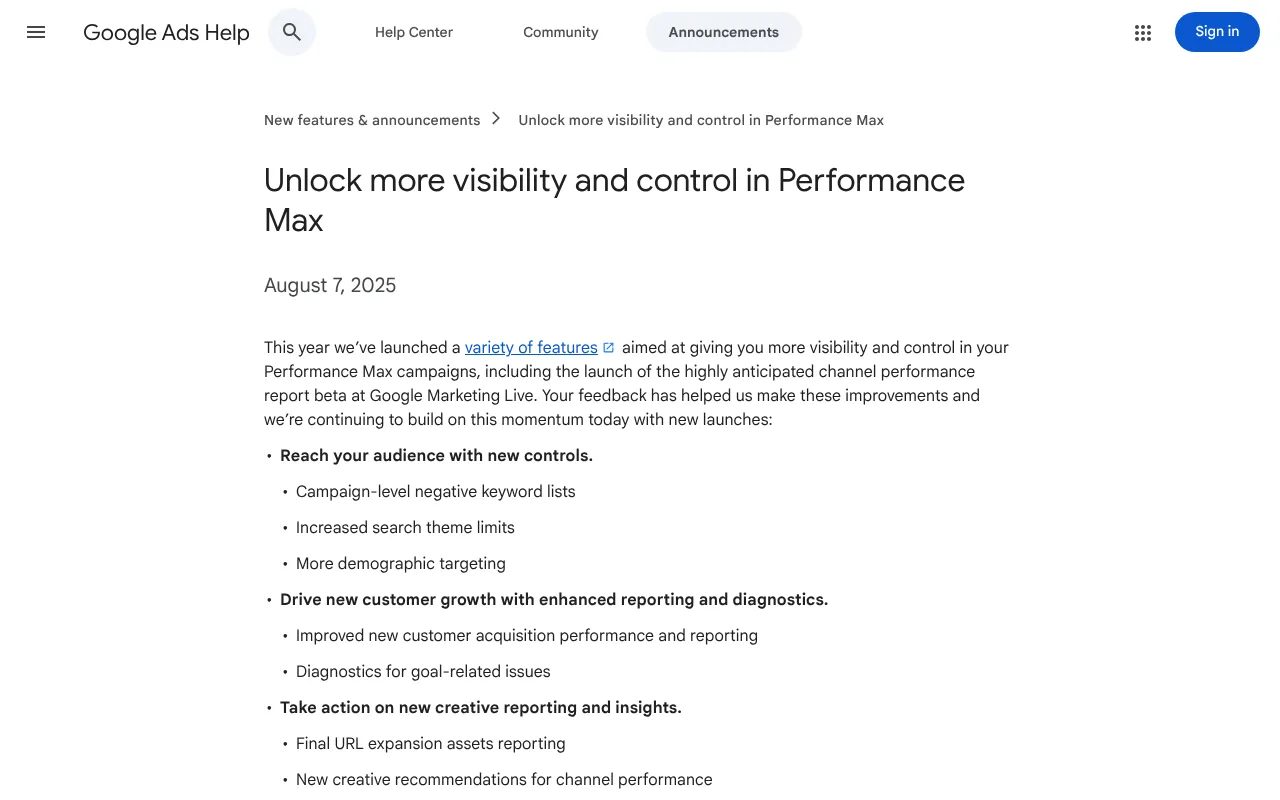
Google’s announcement “Unlock more visibility and control in Performance Max”, dated 7 August 2025: campaign-level negative keyword lists, more search themes, reporting on generated assets. Captured on 19 October 2026.
In detail, that announcement says the search terms report is available for all Performance Max campaigns, that the number of search themes rises from 25 to 50 per asset group, and that assets created by text customisation and final URL expansion become visible, and removable. The channel performance report, launched in beta the same year, shows how results split across channels.
That is progress. But a report only helps if someone reads it, and several decisions still need close watching.
What you still have to check yourself
What Performance Max shows
How results split by channel
The search terms that triggered the ads
The assets created automatically, copy and pages
The keyword and brand exclusions applied
What you have to check yourself
Whether the pages Google picks are the ones you want to show
Whether the generated copy tells the truth about your offer
Whether the campaign mostly captures people already looking for you
Whether the conversions counted look like customers
Landing pages chosen by Google
With final URL expansion, Google can match a search to a page of your site it considers more relevant than the one you set. Its help page reminds you that you remain responsible for checking those pages and that content. A blog post, a job ad or an old page can end up receiving paid traffic. Google lets you exclude URLs from that expansion, except the campaign’s own final URL: exclude the sections that do not sell, and see what a landing page needs for the ones you keep.
Generated copy
Google can write copy from your site. It is now visible in the reports: read it like any text that goes out under your name, because it is your brand that signs it. A generated line that claims a lead time or a guarantee you do not offer puts your credibility on the line; the question goes beyond advertising, and our article on AI and disinformation raises it for everything we publish.
Your own brand
Someone who types your name was already looking for you, ad or not. If Performance Max serves on those searches, it posts good numbers without having added anything. Google offers brand exclusions to prevent that. And for other searches, Google says a Search campaign containing an exact match keyword identical to the search takes priority over Performance Max.
Useless searches
Performance Max now accepts negative keywords, but only on Search and Shopping inventory. How to choose them, and the match rules that catch people out, are in our negative keywords guide.
What the campaign cannot know
The real blind spot is not in the reports, it is in the goal. Performance Max optimises for the conversion actions you give it. If the only one is “form submitted”, it looks for forms, including those from students and suppliers prospecting you. In B2B, the real conversion is decided in the CRM, weeks later. Our guide to sending CRM sales back to Google Ads describes how to send it qualified enquiries.
Then there is volume. Google says the learning period of a bid strategy can take up to 50 conversion events or three conversion cycles. A B2B account that receives a few enquiries a month does not provide enough for the campaign to learn quickly: that is the subject of our article on the minimum budget that gives a signal.
When to launch it, and with what
- Measure first.
Reliable conversion actions, ideally with a qualified stage imported from the CRM.
- Keep search.
Your buying queries as exact match keywords, in a Search campaign.
- Set the exclusions.
Brand, negative keywords, pages not to use.
- Read every week.
Channels, search terms, generated assets, enquiries received.
On an online plush toy shop we work with, the initial review showed that no order had ever been attributed to Shopping: the channel was completely shut. An automated campaign launched on that data would have worked blind. At Palmora Property, a property listings site, it was measurement that was missing: a tag container with one tag and zero events. In both cases, the question was not Performance Max or not, but what the campaign would have had to read.
For a B2B SME, Performance Max therefore comes later: once measurement holds, qualified enquiries flow back and a Search campaign has shown which queries sell. If your buyers are defined first by their job, LinkedIn Ads or the Google Ads or Meta comparison answer the question better. To decide whether and when to open it on your account, our digital marketing offer starts with measurement.
Frequently asked questions
Does Performance Max cannibalise my Search campaigns?
According to Google, when a search exactly matches an exact match keyword in a Search campaign, that campaign is served first. Overlap remains possible on other searches, and on your brand: use brand exclusions and read the search terms report of both campaigns.
Can you see Performance Max search terms?
Yes. According to Google’s August 2025 announcement, the search terms report is available for all Performance Max campaigns, and through the API. As with any campaign, some infrequent searches are left out for privacy reasons. Read it every week to spot the queries to exclude.
Is Performance Max right for a B2B SME?
Rarely to start with. The campaign learns from the conversions it sees, and a B2B SME has few. It becomes worthwhile once the account imports regular qualified enquiries and a Search campaign has established which queries sell. Before that, a Search campaign stays easier to read.
How do you stop Performance Max sending traffic to any page at all?
Through final URL expansion settings: Google lets you turn it off or exclude pages from it, but not the campaign’s own final URL, which keeps serving. Then check in the reports which pages actually receive the clicks. A page that receives paid traffic must be able to turn it into an enquiry.
Sources
- Google Ads Help, about Performance Max campaigns (new tab)support.google.com
- Google Ads, Unlock more visibility and control in Performance Max, 7 August 2025 (new tab)support.google.com
- Google Ads Help, channel performance report for Performance Max (new tab)support.google.com
- Google Ads Help, URL exclusion in Performance Max (new tab)support.google.com
- Google Ads Help, duration of the learning period (new tab)support.google.com
Google Ads, Unlock more visibility and control in Performance Max, 7 August 2025
Read on support.google.com(new tab)Google Ads Help, channel performance report for Performance Max
Read on support.google.com(new tab)Jim · founder of Brain Plus AI
Also in online advertising

Practical guide6 min
Negative keywords: the fastest saving in Google Ads
Every search unrelated to your offer that triggers a click gets paid for. Negative keywords cut that spend in a few minutes a week, provided you read the real searches and know three of Google's rules.

Practical guide8 min
Send your CRM sales back to Google Ads: the guide
In B2B, the sale is signed weeks after the click, by phone or in a meeting. Until Google Ads knows that, it optimises for submitted forms, not for customers: here is how to send it the stages from your CRM.

Choose and price7 min
Google Ads in B2B: the minimum budget that gives a signal
In B2B, a Google Ads budget that is too small does not just cost little: it tells you nothing. The right minimum comes from your click price, your enquiry rate and the number of enquiries you need to judge.