Websites
A business website that brings you customers
From €3,900
excl. VAT · depending on the number of pages and languages
3 weeks
In-house tool · Website feedback
Retouche is our website feedback tool. You tap a heading, a block or a sentence, write what you want changed, and the request leaves with everything needed to find it again. It comes back as a change ready to approve: nothing goes live without your say-so.
Websites
From €3,900
excl. VAT · depending on the number of pages and languages
3 weeks
A small bubble shows up on the site, only for the people who hold the key. You target an element, quote a passage or comment on the whole page, pick the kind of feedback (text, design, structure, bug), and send it, alone or in a batch. Each piece of feedback carries the targeted element, the title of its section, the screen size and the browser: no more explaining where the problem is.
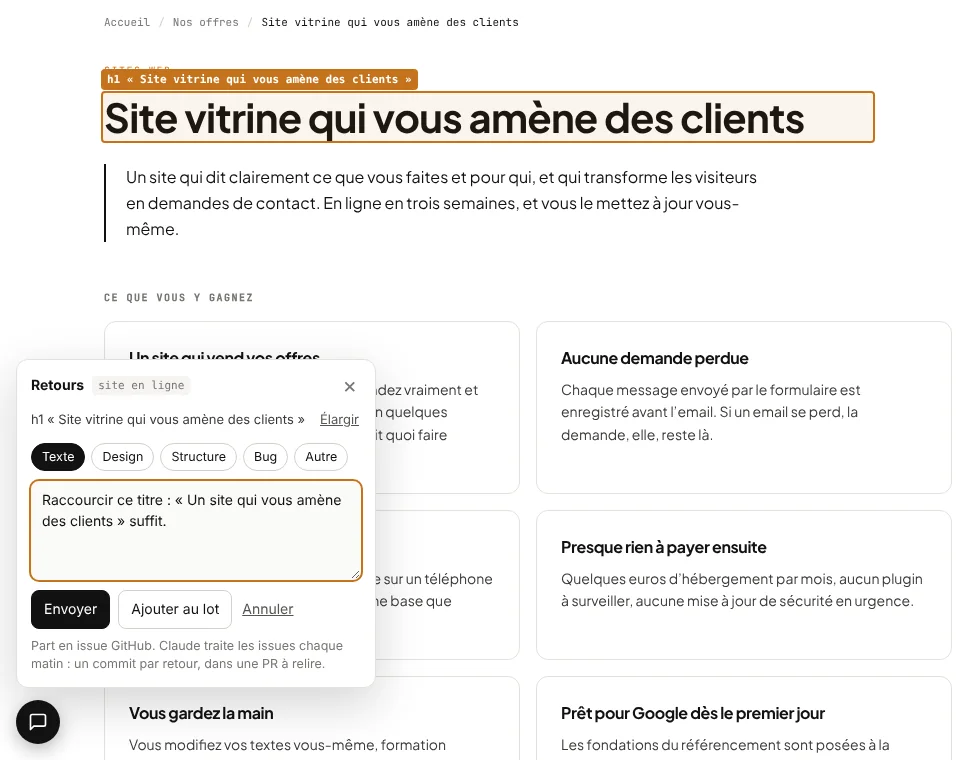
The feedback points at the exact element, with its text and its place on the page. No more “the second block at the bottom, on mobile”.
Each piece of feedback is picked up by our coding agent, which prepares the change and answers in one line: what changed, and where to see it.
Every change goes through a preview that you approve before it goes live.
We put Retouche on your site from the first previews: you comment on the pages instead of writing to us.
The tool stays in place. A text fix or a layout tweak is requested from the page itself.
Each piece of feedback becomes a change you approve on a preview before it goes live.
Websites
From €3,900
Websites
From €5,900
Not for now. It is included in our website and running offers, where it helps most: on a site we know and keep improving with you.
Only the people we open it to. Your site’s visitors never see it.
No. Each piece of feedback becomes a proposed change, with a preview. It goes live when you approve it, not before.
We first check in 20 minutes that it fits your need, and we tell you honestly if another one would do better.